KEY TAKEAWAYS
- On a Class 7-8 truck, the yellow triangle with an exclamation point is most often tied to the aftertreatment or DEF system, not the stability or tire pressure warning it usually signals in a passenger car.
- Ignore a DEF-related warning long enough, and the ECU starts a torque derate, cutting engine power and, in some configurations, capping speed at 5 mph.
- The same triangle can also point to a stability control fault, a brake or air pressure problem, or low tire pressure, and each of those carries a different level of urgency.
- Reading DTC and SPN data straight off the CAN bus lets a fleet flag a developing fault days before the dashboard light ever turns on.
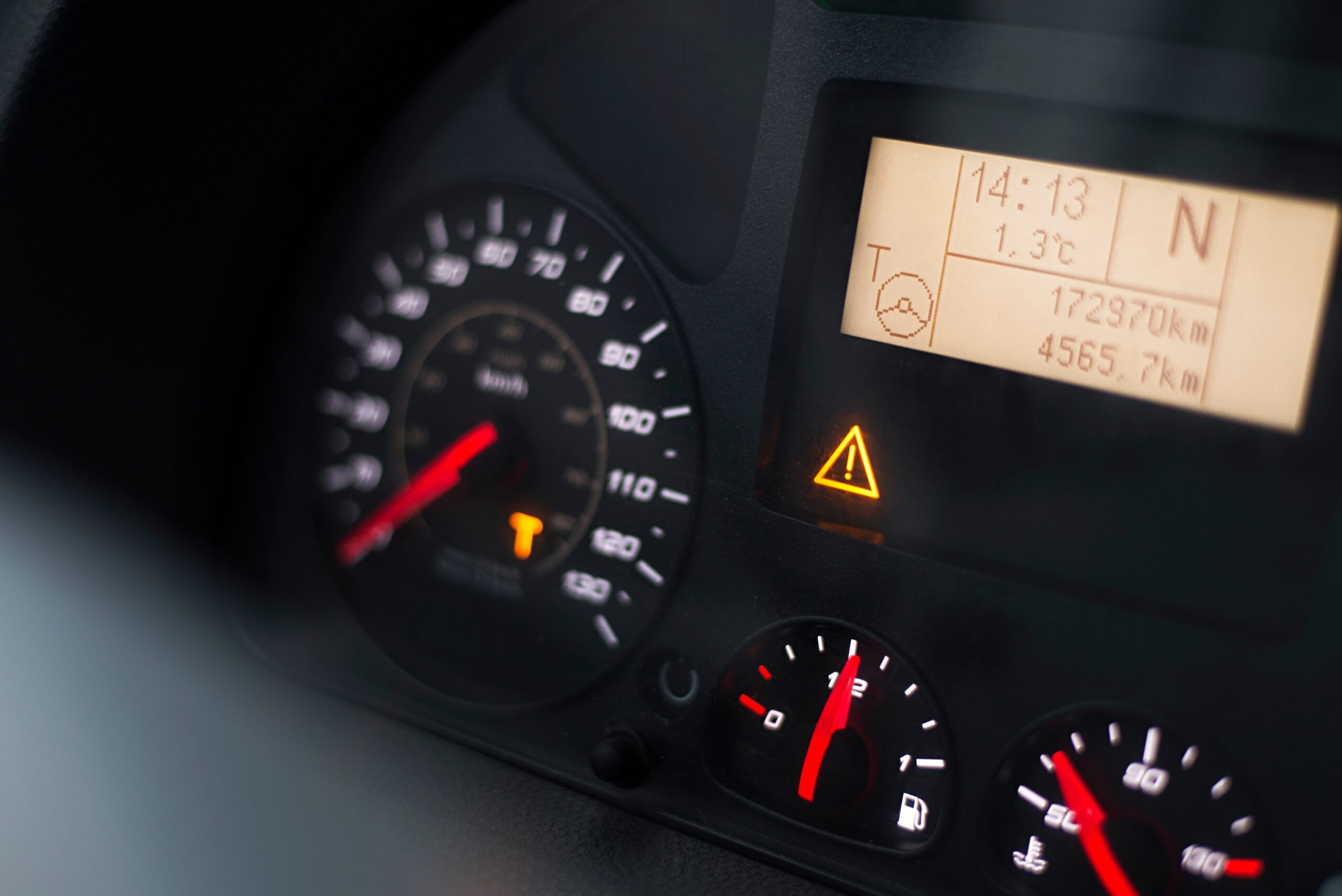
A driver pulls into a truck stop, glances down, and there it is: a yellow triangle glowing on the dashboard. The owner’s manual is three years out of date and buried under a stack of delivery slips anyway. A quick search on a phone pulls up a page written for a Camry owner. None of it explains why a loaded Freightliner just lost five miles an hour on the interstate.
That gap between consumer car advice and commercial truck reality is what this piece is meant to close. In a passenger vehicle, this triangle usually points to a stability system or tire pressure issue, though the level of urgency depends on the underlying fault. In a Class 7-8 truck built after 2010, the same icon is far more likely to mean the aftertreatment or DEF system has thrown a fault, a system tied to EPA emissions compliance that can throttle the truck’s power if ignored. Which system triggered the light changes how a driver or fleet manager needs to react in the next ten minutes.
This blog covers what causes the triangle warning across the major OEM platforms, ranks the four most common triggers by urgency, walks through what a driver should actually do the moment it lights up, and explains how telematics catches the fault behind it before the dashboard ever says anything.
What does the triangle warning light mean in a commercial truck?
Every major heavy-duty OEM, Freightliner, Kenworth, Peterbilt, International, and Volvo, uses some version of this icon as a master warning, and each pairs it with its own in-cab message center or companion text rather than treating the triangle itself as a labeled, named light. The name varies by platform and driver display, but the function doesn’t: it’s a general fault indicator, not a diagnosis. The triangle by itself never tells a driver which system is affected. It means a diagnostic trouble code has been stored in the engine control unit, and that stored code, read as an SPN and FMI pair, is the real fault record worth chasing down. Pulling the DTC, rather than guessing from the icon alone, is the fastest way to know whether someone needs to pull over now or just note it for the next scheduled stop.
This isn’t just a maintenance nicety either. Under FMCSA’s vehicle inspection and repair rules, a driver who spots a defect during the day must document it, and a carrier has to repair anything that could affect safe operation before the truck runs again. A stored DTC is the same record most fleet telematics platforms are built to read, and Intangles’ InGenious pulls that code the moment it’s set, instead of waiting for a driver to notice the light.
Four most common causes in commercial trucks, ranked by urgency
Not every trigger behind this warning carries the same weight. The four causes below cover most real-world cases, starting with the one that has the highest operational consequence and ending with the one that can usually wait until the next stop.
Aftertreatment or DEF system warning
This is the most frequent trigger in 2010-and-newer Class 7-8 diesel trucks, a direct result of the EPA’s selective catalytic reduction mandate for that model year. Since 2010, nearly every on-road diesel truck has used diesel exhaust fluid as part of an SCR system to cut nitrogen oxide emissions, and the EPA has documented how these systems are built to force a sharp cut in speed or power the moment DEF runs low, or a sensor fails.
A handful of things typically sit behind this specific warning: a low DEF tank level, DEF quality that has drifted out of spec, a failing NOx sensor, or a drop in SCR catalyst efficiency. In fault-code terms, a low tank level usually shows up as SPN 1761, one entry in the larger set of diagnostic trouble codes that cover aftertreatment faults on a Class 7-8 truck, distinct from the codes used on lighter vehicles.
Drivers don’t need to memorize any of that. What matters is the consequence: ignore it long enough, and the ECU begins a staged torque derate that can eventually cap speed at 5 mph, turning a loaded highway run into a safety problem, a blown delivery window, and a real shot at an out-of-service order at the next inspection.
Urgency: amber, climbing to red if it goes unaddressed for a fuel cycle or two. Check the DEF tank level first, since it’s the most common cause by a wide margin. If the level looks fine, the fault is more likely a sensor or SCR issue, worth a shop visit before the trip wraps up. If the derate has already kicked in, pulling over and calling dispatch is the right call.
Related article: Enhancing Fleet Performance with DEF Monitoring and Telematics
Electronic stability control system warning
This one behaves closer to how it works in a passenger car: the stability system has either deactivated itself or picked up a fault, usually in a wheel speed sensor or the steering angle sensor. The stakes just go up on an 80,000-pound loaded truck. Since 2017, NHTSA has required electronic stability control under Federal Motor Vehicle Safety Standard 136 on truck tractors and large buses above 26,000 pounds GVWR, specifically because ESC cuts down on untripped rollovers and helps a driver keep control once a vehicle starts to lose it. A fault here means a federally mandated safety system isn’t doing its job on a modern fleet truck.
Urgency: moderate. Reduce speed, skip the abrupt lane changes, and get the truck inspected when it’s practical to do so.
Brake system or air pressure warning
Commercial trucks run on compressed air brakes, and a pressure drop below the safe threshold isn’t the same thing as a low brake fluid light in a passenger car. It usually points to an air leak or a compressor failure, either of which directly affects stopping distance on a fully loaded rig. Brake and air system defects are consistently among the top reasons vehicles get pulled out of service during roadside inspections, per the CVSA’s North American Standard Out-of-Service Criteria.
Urgency: high. A brake or air pressure warning means pull over now, not at the next exit.
TPMS or tire pressure warning
Tire condition and inflation on commercial vehicles fall under 49 CFR 393.75, which sets minimum tread depth and inflation standards for every axle position, and a severely underinflated tire can trigger an out-of-service order on the spot. Plenty of fleets now run tire pressure monitoring as standard practice, even though it isn’t the same blanket federal mandate it is on lighter vehicles, mostly because a low tire on a fully loaded drive axle wears out fast and raises blowout risk right along with it.
Urgency: low to moderate under normal conditions, higher on a heavily loaded axle. Check pressure at the next safe stop, and don’t hold highway speed on a tire that looks visibly low.

What commercial drivers should do when this light appears
The first thing worth checking is whether anything has actually changed in how the truck drives. A drop in power or a lower top speed usually means a derate has already started, and that turns “note it and move on” into “get off the road now.”
From there, a short sequence covers most of what comes up. Check the DEF level at the next safe stop, since it’s the most common root cause by far. Note which light is on, whether performance has changed, the current load, and how far out the destination is, then pass that exact information to dispatch instead of a vague “the light’s on.”
And skip routing through a weigh station or port of entry with an active amber fault showing. If that fault happens to map to a CVSA out-of-service criterion, an inspector can place the vehicle out of service on the spot, and a minor issue turns into a multi-hour delay for no good reason. A driver vehicle inspection report that documents the light, the time it appeared, and any change in performance also gives the shop a head start once the truck reaches a bay, rather than a technician starting from scratch.
How fleet telematics catches these faults before the warning light appears
The pattern most fleets know too well goes something like this: a driver calls from a weigh station parking lot, the truck is loaded, derate has already started, and the nearest authorized shop is 40 miles out. By the time the triangle lights up the dash, the fault has usually been building for days already.
Intangles’ InGenious device reads the DTC and SPN values behind this warning directly off the CAN bus, and the platform surfaces the likely root cause before a driver ever notices the dashboard icon. On the aftertreatment side, SCR conversion efficiency tends to drift downward gradually well before a fault code actually fires. SPN 3216 and SPN 3226, the inlet and outlet NOx sensor readings tied to that conversion process, show the decline as a trend long before either one crosses the threshold that trips the triangle. When InGenious catches that drift, InRoute fires a maintenance flag days before the dashboard light would have appeared, so the fleet manager schedules the repair, and the driver never sees the warning at all.
The same logic extends past DEF. Brake pressure trends, stability sensor drift, and tire pressure decline follow a similar arc, a slow change that shows up in the data long before it crosses the threshold that lights up the dash. A fleet manager gets that flag early enough to book the repair during planned downtime instead of scrambling after a call from the road. Once a fault is flagged, operations automation handles the scheduling and task assignment, so the repair gets booked instead of sitting in an inbox.
Finding out about a fault after it has already cost a delivery window is one way to run a fleet. Catching it while the truck is still parked in a bay is another.
Intangles’ predictive vehicle health monitoring is built around that second option, reading the same DTC and SPN data behind this warning light across engine, aftertreatment, brake, and stability systems, and surfacing the trend before any of it ever reaches the dashboard, regardless of which OEM platform the fleet runs.
Discover how Intangles’ predictive vehicle health monitoring or get in touch with our team to find out how Intangles helps fleets catch aftertreatment, brake, stability, and tire faults before they reach the dashboard.
KNOW MORE
Frequently Asked Questions
How does DEF monitoring data reach a fleet telematics platform?
DEF-related data originates in the truck’s engine control module and travels over the vehicle’s J1939 network, which telematics hardware taps into through the OBD or diagnostic port. From there, values like DEF tank level, quality, and dosing rate get sent to a cloud platform where they can be tracked over time instead of only surfacing as a single dashboard alert.
What is the difference between reading DEF data from J1939 and OBD-II?
J1939 is the heavy-duty network standard used by Class 6-8 trucks, and it carries far more granular data than OBD-II, including the SPN and FMI codes specific to aftertreatment and SCR components. OBD-II was built mainly for light-duty vehicles and standard emissions codes. A telematics device built for commercial trucks needs to read both, since some fleet vehicles still carry OBD-II style ports alongside J1939 data streams.
Does Intangles require additional DEF tank sensors to monitor DEF levels?
No. Intangles reads DEF level, quality, and dosing data directly from the sensors the OEM already installed, without bolting anything onto the tank itself, so there’s no downtime for installation. Every fleet runs a slightly different mix of engine platforms and model years, and working out the exact setup for a specific roster is usually a short conversation rather than a shop visit.
What DEF-related alerts can InRoute generate from CAN bus data?
InRoute can flag a low tank level trend before it reaches a critical threshold, a DEF quality deviation outside the normal concentration range, and a decline in SCR conversion efficiency that typically shows up before a formal fault code does. Each one ties back to the specific SPN behind it, so a fleet manager knows exactly what triggered the alert instead of just seeing a generic warning.
How does the OBDonUDS 2027 transition affect DEF monitoring for newer trucks?
Starting with the 2027 model year, new internal combustion vehicles move to OBD on UDS, which replaces the older SAE J1979 communication framework that has supported OBD-II since 1996. The underlying SPN and fault data behind DEF monitoring stays conceptually similar, but the communication protocol changes, so telematics hardware built only for legacy OBD-II will need an update to keep reading aftertreatment data accurately on newer trucks.
How can a fleet manager see this kind of vehicle health data before a light ever appears on the dashboard?
The same DTC and SPN data behind this warning can be read continuously rather than waiting for a threshold to trip, which is the basis of predictive vehicle health monitoring. Fleets running this kind of monitoring typically get a maintenance flag days ahead of the fault code, giving a shop time to schedule the repair instead of reacting to a roadside call.







We’re looking forward to meeting you